Police Scanner X
4.310.61KReviews
Analysis ByAppCompare
I approached Police Scanner X as a first-time listener rather than someone already familiar with scanner apps. That matters because the experience is not really about tapping a single button and receiving a neatly edited news broadcast. It is about exploring live public-safety audio and learning how to choose a feed that fits what you want to hear. After spending time with it, I found a free news and magazines app with a clear appeal for curious listeners, local-news followers, and anyone who wants a different way to follow events as they develop.
The app comes from BEROBO, the developer behind Police Scanner Radio, and its store summary presents it as the latest police scanner from the company. It has been available since January 19, 2017, so this is not a brand-new experiment with no history behind it. The current release is version 3.2, and it runs on Android devices using version 6.0 or later. That combination makes it accessible to many older phones, although the quality of the experience still depends heavily on the audio sources available in the places you care about.
Getting from installation to a useful first listen
What to expect before choosing a feed
The first thing I would tell a new user is to adjust expectations. This is not a replacement for a conventional newspaper app, television news channel, or official emergency-alert service. Instead, it gives you a way to listen to scanner audio and decide which activity is worth following. The value comes from access and immediacy, but that also means the material can be fragmented, repetitive, quiet, or difficult to understand when several people speak quickly.
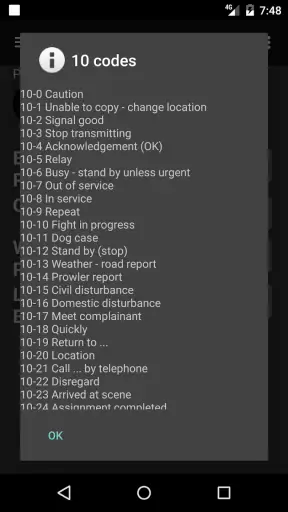
That trade-off is central to the app. A polished news app filters events, adds context, and explains what happened. Police Scanner X puts more responsibility on me as the listener. I have to recognize locations, understand abbreviations, tolerate pauses, and avoid treating every conversation as a confirmed public report. For me, that made the app more interesting than a standard headline feed, but also less effortless.
The app is free, which makes it easy to try without committing money first. Its Everyone 10+ content rating is a useful reminder that the subject matter may not suit very young children, even though the application itself is simple to operate. I would be particularly careful about using it around children because scanner audio can involve stressful or upsetting situations without the explanatory context found in a normal news report.
Its audience is quite specific. I can see it working well for someone who follows local activity, enjoys understanding how public-safety communications sound, or wants background listening while doing something else. It is less suitable for a person who only wants verified summaries, exact incident locations, or a calm stream of major headlines. If that is your goal, a trusted local-news application or official alert channel will usually be clearer.
Setting up the first session without getting lost
My advice is to begin with a simple purpose instead of browsing randomly. Decide whether you want to explore activity near home, listen while traveling, or simply understand how scanner feeds work. That choice gives the first session a direction. Without it, it is easy to jump between sources, hear fragments from unrelated areas, and conclude that the app is confusing when the real problem is the lack of a listening plan.
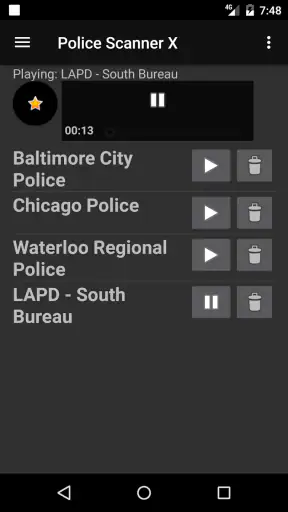
Once installed, I would give myself a few minutes to inspect the available choices before settling on one. The important early task is not to listen to everything; it is to identify a feed that sounds active enough to follow and relevant enough to hold your attention. A quiet source is not necessarily broken, and a busy one is not automatically better. A feed with constant traffic may be harder for a beginner because every exchange arrives before you have learned the local terms.
Headphones are useful for this first setup, especially in a noisy room. Scanner speech can be compressed, distant, or interrupted by static-like sounds, and a phone speaker may make short transmissions blend into background noise. I also prefer starting at a comfortable volume rather than turning it up immediately. Sudden bursts of speech can be surprisingly loud, and listening for a longer period is easier when the sound is not exhausting.
There is another practical habit I recommend: keep a note of the feed or area that seemed most understandable. That small step saves time on later sessions. Instead of treating every launch as a fresh search, I can return to the source that already proved useful and then explore outward when I feel more comfortable. This makes the app feel less like a directory and more like a personal listening routine.
The first successful action: follow one exchange to its meaning
For me, the first meaningful success was not merely hearing voices. It was choosing one feed, listening long enough to recognize its rhythm, and following a short exchange from the initial call to the next update. That changed the experience from random audio into a sequence I could understand. New users should aim for that modest win rather than expecting a dramatic event immediately.
When a transmission begins, I try to catch three things: the general location, the type of situation, and whether another update follows. I do not need to understand every word. Even partial recognition can establish a useful thread, while trying to decode every abbreviation at once makes the experience tiring. This approach is especially helpful when the speaker is fast or the audio quality is uneven.
A realistic everyday use case is listening during a commute when I want something more immediate than a podcast but less demanding than a video. I can select a familiar area, keep the phone available, and listen for a while without needing to stare at the screen continuously. If the feed becomes repetitive or unclear, I can stop without losing the plot of a long program. That flexibility is one of the app’s strongest qualities.
Another useful scenario is checking the scanner while following a developing local story through regular news coverage. The scanner does not replace the later report, but it can help me understand why an area is receiving attention. I treat what I hear as an early, incomplete signal rather than a finished account. That distinction protects me from turning an overheard fragment into a confident conclusion.
I would not use it as my only source during an emergency. Scanner communication can be delayed, incomplete, or difficult to interpret, and a listener may misunderstand a location or situation. For urgent instructions, official announcements remain the better choice. The app is more valuable as a way to observe and learn than as a substitute for authoritative guidance.
Common confusion and how I worked around it
The most common confusion is assuming that every feed will be equally active or equally easy to understand. In practice, the listening experience can vary considerably from one source to another. Some sessions may contain long pauses, while others may move too quickly for a newcomer. I learned not to judge the entire app from one unhelpful feed. Switching focus is often more productive than repeatedly increasing the volume or waiting indefinitely.
Another point that surprised me is how little context a transmission may contain. People communicating within a professional system already share terminology and background that I do not have. A short phrase can make sense to them but sound incomplete to me. Rather than filling in the gaps with guesses, I wait for a later update or compare the general situation with a reliable news source. That restraint is a skill the app quietly requires.
Silence can also be misleading. A quiet period does not necessarily mean nothing is happening, and a busy period does not necessarily indicate a major event. Scanner traffic reflects communication, not a carefully ranked list of public importance. I found it helpful to think of the audio as a window into activity rather than a complete measure of what matters in a community.
Privacy and sensitivity deserve attention too. Even when audio is publicly accessible, the people involved may be dealing with stressful circumstances. I avoid recording, reposting, or treating personal details as entertainment. I also would not use the app to interfere with an active response or approach a location simply because I heard something interesting. Responsible listening is part of getting value from this type of application.
Some users may wonder whether the app is suitable for background listening. My answer is yes, with limits. It works when I am doing a low-attention task and can accept that parts of the conversation will pass by. It is not ideal while driving if it distracts me, and it is not a good choice when I need complete concentration. The audio is inherently unpredictable, so I would keep the session secondary to whatever I am doing.
What separates it from ordinary news alternatives
Compared with a standard news application, Police Scanner X feels closer to raw source material than finished journalism. A news app gives me headlines, summaries, images, and a clearer sense of importance. This scanner app offers immediacy and atmosphere, but I have to do more interpretation. I prefer the scanner when I want to explore what is unfolding; I prefer conventional news when I need a concise explanation I can trust quickly.
Compared with a podcast, the difference is even sharper. Podcasts are structured and edited, while scanner listening is unpredictable. That unpredictability can be the appeal: I am not being guided through a fixed story. It can also be the weakness, because there may be no satisfying conclusion. I would choose a podcast for a planned listening session and this app for open-ended observation.
It also differs from a social-media feed. Social platforms add comments, speculation, and rapid reactions, while scanner audio gives me fewer opinions but less explanation. I find that useful when I want to avoid a crowded discussion, though it means I must supply my own context carefully. The app is at its best when paired with, rather than substituted for, reliable reporting.
The practical trade-off is time. A few minutes may reveal nothing, while a longer session may finally produce a coherent sequence. That makes the app a poor fit for users who expect instant, predictable information. On the other hand, people who enjoy patient observation may find the lack of editorial packaging refreshing. It feels more like tuning into an ongoing environment than opening a list of articles.
Moving beyond the first listen
After the first successful session, I would build a small routine rather than constantly chase novelty. Keep the areas that are understandable, discard the ones that are consistently unhelpful, and return at different times to learn how the rhythm changes. This is more rewarding than assuming the busiest moment will always be the best one. It also helps distinguish a genuinely useful source from a temporarily active one.
A second advanced habit is to listen for patterns in communication rather than isolated dramatic phrases. Repeated references to the same area, a sequence of updates, or a change in the pace of transmissions can provide more meaning than one striking sentence. I still would not treat those patterns as proof of what happened, but they can tell me when it is worth checking a reputable news source for confirmation.
I also recommend using the app as a learning tool for media literacy. Ask what is directly heard, what is inferred, and what remains unknown. That three-part separation prevents the most common mistake: turning incomplete audio into a complete story. It is a small discipline, but it makes the experience more thoughtful and protects against unnecessary alarm.
For people concerned about phone age, the minimum operating-system requirement is Android 6.0, so owners of older compatible devices may still be able to try it. The app has reached more than one million installs and holds a 4.3 average from roughly forty thousand ratings, with about eleven thousand written reviews. Those figures suggest a substantial audience, but they should not replace testing the feeds that matter to you because personal usefulness depends on location and listening habits.
The developer’s focus on police scanner listening gives the app a narrower identity than broad news platforms. That specialization is a strength when I want this exact type of audio, because the purpose is immediately recognizable. It is a limitation when I want weather, politics, business reporting, or carefully explained local journalism in the same place. I would not install it expecting an all-purpose news center.
My recommendation after using it
I recommend Police Scanner X to curious listeners who are willing to spend a little time learning how scanner audio works. It is free, approachable enough for experimentation, and most rewarding when I choose one relevant feed and listen patiently. The path to success is simple: start with a clear area or purpose, use headphones if needed, follow one exchange instead of chasing every sound, and verify important conclusions elsewhere.
I would skip it if you need official emergency instructions, polished reporting, or guaranteed action every time you open the app. I would also avoid making it a constant source of background anxiety. The raw nature that makes scanner audio compelling can make it emotionally tiring, particularly when the listener has no local knowledge or keeps searching for incidents rather than listening with a defined purpose.
My final view is positive but measured. This is not a replacement for the usual news tools; it is a specialized way to hear public-safety communication with less editorial filtering. Once I accepted that, the app became easier to use and more interesting. The best first goal is not hearing something dramatic, but learning to recognize one useful thread without overinterpreting it. For the right listener, that makes this free app worth keeping available when ordinary headlines feel too distant or too polished.
FAQ
What is Police Scanner X and what can I use it for?
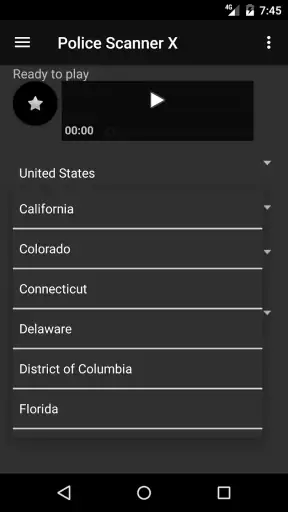
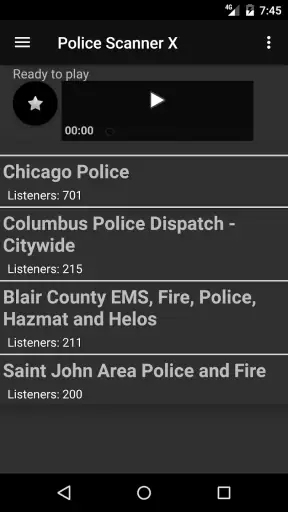
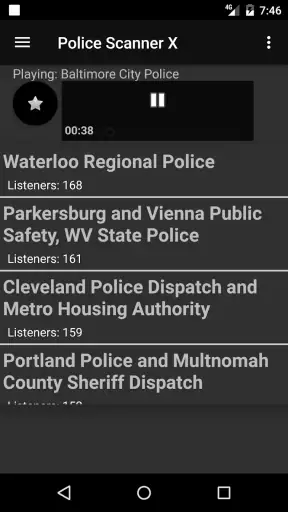
Police Scanner X is an app designed to let users listen to publicly available police, fire, emergency, and other public-safety radio streams from supported locations. After opening the app, you can browse available feeds, search by area or category, and listen to live audio when a stream is online. Availability and coverage depend heavily on your country, local agencies, and the sources used by the app.
Does Police Scanner X provide official or encrypted police communications?
The app generally relies on publicly accessible scanner feeds rather than providing direct access to official department systems. It cannot normally unlock encrypted communications, restricted channels, or private law-enforcement networks. Some feeds may be delayed, incomplete, unavailable, or supplied by third parties, so the information should not be treated as an official emergency notification or as a substitute for instructions from local authorities.
Does Police Scanner X work everywhere, and does it require an internet connection?
Police Scanner X requires an active internet connection to load station lists and stream audio, whether you use mobile data or Wi-Fi. Its usefulness varies by location because not every city or region has a publicly available feed. Before downloading, check whether your area is supported and remember that listening while traveling may consume significant data, especially during extended sessions.
Is Police Scanner X free to download and use?
The download and basic listening options may be free, but the exact experience can depend on the version available for Android or iOS. Some features may include advertising, optional purchases, subscriptions, or limits on access to certain feeds. Review the app-store listing carefully before installing, including the developer information, in-app purchase details, and subscription terms, since pricing and features can change.
Is it legal and safe to listen to police scanner feeds with Police Scanner X?
Listening to publicly available scanner audio is permitted in many places, but laws differ between countries, states, and municipalities. Restrictions may apply to rebroadcasting audio, using scanner information to assist criminal activity, or listening while committing an offense. Use the app responsibly, respect privacy, and avoid interfering with emergency operations. For urgent help, always contact your local emergency number instead of relying on the app.
Pros
- Live police
- fire
- and EMS scanner feeds in one app.
- Simple interface makes browsing local channels straightforward.
- Useful for monitoring emergencies and public safety activity.
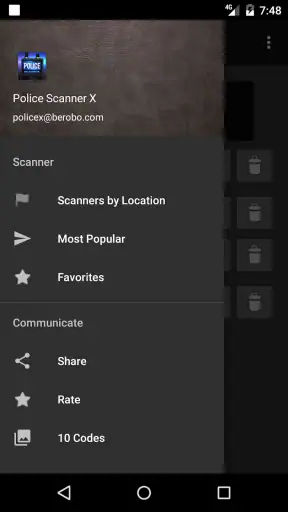
- Channel listings help users discover scanners by location.
- Can provide situational awareness during local incidents.
Cons
- Feed availability depends heavily on your location.
- Some channels may be offline
- delayed
- or temporarily unavailable.
- Audio quality varies between scanner sources.
- Frequent alerts or background playback can drain the battery.
- Content may be stressful or unsuitable for younger listeners.